You would need to sort on something in the primary table of your NL(Table) function. You can't sort on fields from a linked table.
Since you can't get to the Vendor Name via the Vendor Ledger Entry, you won't be able to sort by the name. You can only use fields in the VLE table.
Date
Votes
3 comments
-

Jet Reports Historic Posts How can I sort the Name field in this report?
-

Donald Lanthier I'm having the almost the same issue with =NL("ChampLien","Item","No.")
I used Table Builder to generate my report, but I cannot sort by No, just by adding the "+" sign in front the filed name "+No", I'm receiving a #VALEUR! in the =NL(...) field -

Harry Lewis You can use the technique described in Sorting Your Jet Reports.
For example:
Let's suppose I have used the Table Builder to create this report:
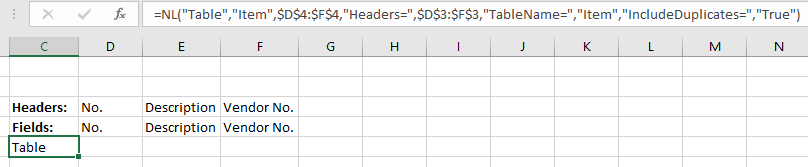
If I wanted to perform a descending sort based on the vendor number, I can add a sorting filter at the end of the NL(Table) function:

If I were working the the function you mention...
=NL("ChampLien","Item","No.")
would be changed to:
=NL("ChampLien","Item","No.","+No","*")
Please sign in to leave a comment.