Hi
Can someone tell me when i have install Jet Essentials it look like this on my laptop. See MyJetReport.docx
But on my other laptop look like this. See OtherJetReport.docx
What is wrong?
Date
Votes
3 comments
-

Jet Reports Historic Posts Hello -
I see there is an exclamation point (!) over the Data Source Settings button. This would indicate some sort of issue.
If you click that button, there should be some text at the bottom of the screen that says that you are or are not licensed or some other message that may help determine the issue. -
Jet Reports Historic Posts Hi
When I press on Data Source Settings button than I get Data source Intial Configrration. See the attach file Dok4.docx. -
Jet Reports Historic Posts As you can see, this let's you know that there are no data sources settings configured on this computer.
You can proceed with one of the three options:
1) If you know your data source settings (you can view the settings for NAV_HK on your other computer), you can manually configure them on this computer
2) From screen shots you included originally, it does not appear that your organization shares settings among users. Thus, don't worry about option #2
3) You can export your settings from your other computer (to an XML file) and then import those settings on this computer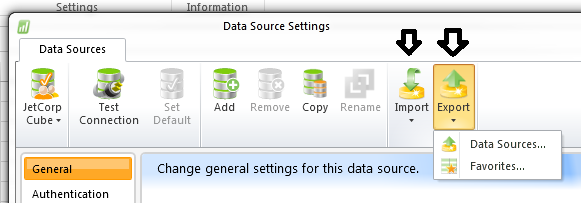
I hope that helps.
Please sign in to leave a comment.