I am trying to create a running tally on a report that has five rows that expand. I can't figure out how to keep the tally going when the row changes.
Column R has the tally.
(Row 1) =IF(COUNTIF($E1:$E5,$E5)=1,$O5,$O5+$R4)
(Row 2) =R5+O6
(Row 3) =R6+O7
(Row 4) =R7+Q8
(Row 5) =R8+Q9
Row 1 works perfectly upon expansion. But in Row 2 I do not know how to account for the expansion. It no longer starts at R5 - it could start at R12, but it counts R5. I've tried SUMIF, but it does not account for the expansion either - if I sum over a range, the range just shifts down. If I lock it at R1, then when the five rows repeat they are locked at R1 instead of where they should be. Thanks for any help.
Date
Votes
5 comments
-

Jet Reports Historic Posts Official comment Let's look at a simplistic example of using what is referred to as an "anchor row".
If I have a report that sums up some numbers…
When I run the report, I see that the tally does *not* reset itself between my sections: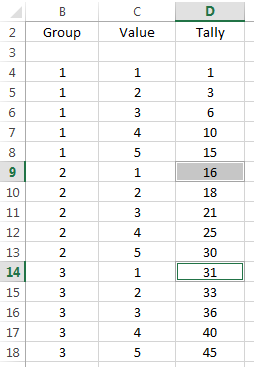
If, however, I extend my replicated region in cell B4 by 1 additional row ("Rows=2", giving us an "anchor" row)…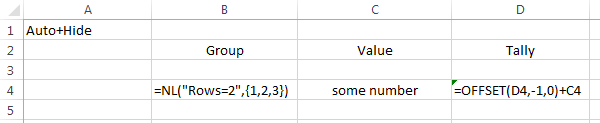
Then, when I run my report, the anchor serves as my reset point and allows my totals to accurately reflect what I'm after.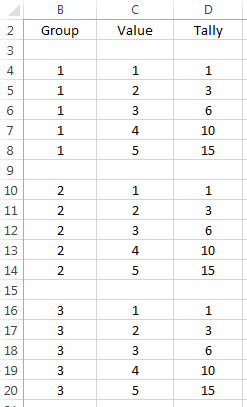
Make sense? -
Jet Reports Historic Posts If I understand your question correctly, have you considered adding a blank row to the end of your replicated region so that it can serve as the "reset point"?
-
Jet Reports Historic Posts I've only been doing this for a couple of weeks. I added a line, but I'm not clear how to use it.
-
Jet Reports Historic Posts Yes, that makes sense, but I want the opposite. I have Rows=5, and I don't want it to reset between them. (But it does).
Row1 = Quantity on Hand
Row2 = Quantity on Production Order
Row3 = Quantity on Purchase Order
Row4 = Quantity in Components (different from Prod. Order)
Row5 = Quantity on Sales Order
I want a running tally of the supply and demand, not a separate tally of each. Thank you for your time! -
Jet Reports Historic Posts It worked! It was the OFFSET code I was looking for. Thanks again for your time!
Please sign in to leave a comment.