Hello,
we work with Office 2013 and have MS Word documents with an embedded Excel table. Everything works fine until the Jet-Addin in MS Excel is activated. When clicking on the embedded table there is an error message saying that Excel cannot be found to open it.
Does anyone have an idea what is wrong there?
Best regards,
Uta
Date
Votes
2 comments
-

Jet Reports Historic Posts Hello Uta -
This has been reported to Microsoft. Unfortunately, this is a known issue when Excel includes certain Excel add-ins (and Jet Essentials falls into that particular category).
The Jet Reports Development Team is considering methods by which Jet Essentials might be able to avoid this issue.
For now, the only known workaround is to deactivate the Jet Essentials add-in whenever you wish to edit the Excel object from within Word.
One thing that can be done to make this easier is to place the Add-in short cut on Excel's Quick Access Toolbar.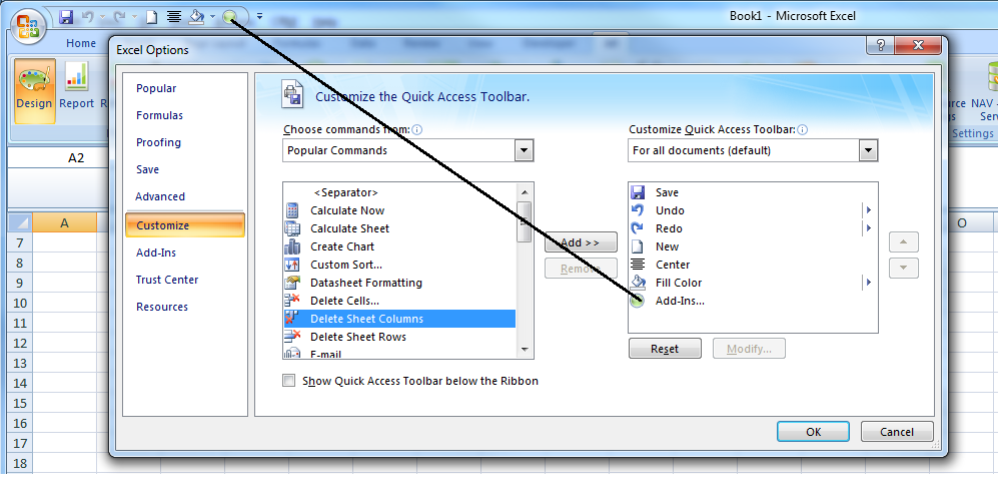
Then it is a simple matter to click that icon, check or uncheck the box for Jet Essentials, and click the OK button.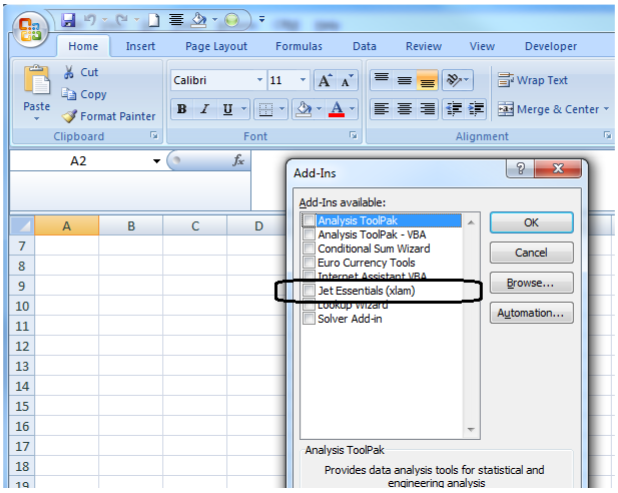
-
Jet Reports Historic Posts Thank you for the quick answer. At least I don't have to search for the reason of this behavior any more ;-)
Please sign in to leave a comment.