Hi,
I knew from last time I have got a new computer JR might have some problems with the new setup. But this time it's a completely mess.
I often get strange error messages like the one attached.
With one JR report I even was not able to get in the designer mode after such an error message - so I had to rewrite the whole report.
Currently I'm trying to sort out where the special error from the attached screenshot comes from. The point here is JR is replacing the NF formulas with the current result as text like ="xxx"and makes in turn another refresh impossible because of the missing NF formulas. Even in designer mode the text still appears instead of the formulas.
I'm working with the same environment as before W7 + Excel 2010 + JR 15.01 just another computer with a fresh installation.
Any ideas how to get rid of the strange behaviour?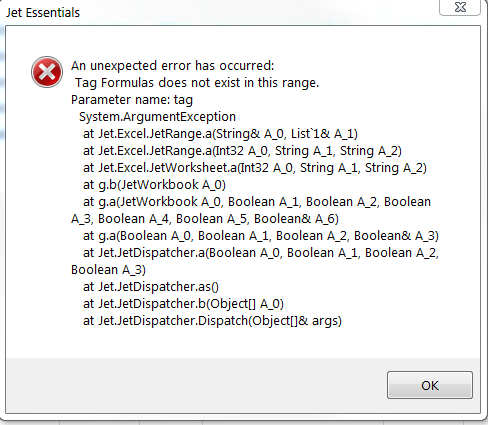
Cheers,
André
Date
Votes
4 comments
-

Jet Reports Historic Posts Hello abap,
I have not heard or nor encountered this scenario before.
What is the version of Jet Essentials 2015 build installed (Jet ribbon > Help > About)
Can you share a copy of the report saved in report mode?
Cheers. -
Jet Reports Historic Posts Hi,
I have tested it a little bit.
The report should give the sales invoices per month and per sales person (filtered on 'salesperson 1 code').
It's a pretty simple report so far and it has worked on the old computer.
a) It works up to four rows = invoices. If there are more than four rows (invoices) within the filter the error appears.
The right result is shown but the formulas are replaced with the text. There is no "+values" in A1.
b) If I remove all NF formulas (leaving just the NL row formula) no error message appears no matter how many invoices are within the filter.
c) I have replaced all NF formulas with NL formulas. Same result as a)
I can work with that report having a backup saved. I run the report as long as no error appears. If the error appears (and the NF formulas are replaced) I close the file (without saving) and open it again. But I guess it shouldn't be the way of working with JR.
I have attached a stripped down version of that report in report mode.
We are working with Jet Essentials 15.0.15091.
I know its not the latest version but as I said it has worked without problems on the old computer.
Cheers,
André -
Jet Reports Historic Posts Hello abap,
Thank you for providing a copy of the report.
We are able to reproduce this error.
The issue appears to be that you are applying the sort function incorrectly in your report.
The NF() functions have + signs in front of them. This is problematic and causes issues at report run-time
It is recommended to sort by the filters on the record key with sorting signs (+ or -) on those filters.
Please take a moment and review the below Knowledge Base article for further information
Sorting for Replication Functions
https://jetsupport.jetreports.com/hc/en-us/articles/218953718
Cheers. -
Jet Reports Historic Posts Hi,
Thank you very much for the hint. I have removed the '+' sign and it seems to work.
But there is at least one point regarding that issue where I think it's still strange and another point is dangerous .
First of all that sign at that place has nothing to do with a try to sort something.
It's simply a standard Excel behaviour when you enter a formula manually with a starting '+'. Excel leaves the '+' and puts a '=' in front of that formula.
As it's much faster to hit the '+' button than to get the '=' sign I always use that way to enter a formula manually.
=> It did work on the old computer.
I just tried it with another similar report I often use. The same error message. Removed the '+' signs. Everything is OK.
=> It also did work on the old computer. That's strange.
The dangerous point here is when a user runs the report and the error message appears and the user then closes + saves the report - the report is destroyed!
Nevertheless thank you very much again for the help.
I will go through all our reports and remove the '+' sign and will take care in the future not to hit the '+' button to enter a formula manually (in JR reports).
Even I still not really understand that (new) behaviour :( .
Cheers,
André
Please sign in to leave a comment.