Hi
Please help me with the customer posting filter for obtaining the customer record key , where i wanted customer record keys for say two customer posting groups i.e. example in my case IT and ZU , I using IT|ZU with this NL Sum is working fine NL Rows is not getting the customers from both the customer posting groups
Individually the customer posting filter IT or ZU is fine only if I need customers from both these groups , I have an issue.
Please help me.
Warm regards
Ravi -Hong Kong
Date
Votes
3 comments
-

Jet Reports Historic Posts Tried even IT&|ZU , still it doesn't work
-
Jet Reports Historic Posts Hello Ravi,
I too encountered the same issue and I have Jet Professional 2017 installed. If I run the against my CRONUS database and filter for EU, DOMESTIC and FOREIGN, it works fine.
However, when I apply the EU|DOMESTIC filter, I get the below message: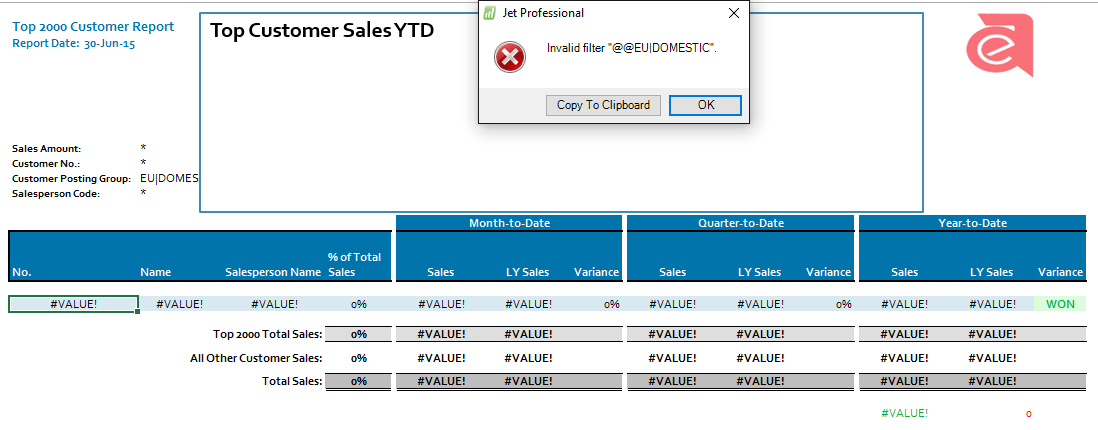
So to fix that issue, I removed the "@@"& in front of the cell reference to G20.
=NL("Rows","18 Customer",,"-62 Sales (LCY)",$G$18,"1 No.","@@"&$G$19,"21 Customer Posting Group","@@"&$G$20,"29 Salesperson Code","@@"&$G$21,"Limit=",$C$3,"55 Date Filter",$U$6)
When I took this out from the Jet funciton, the function now looks like this:
=NL("Rows","18 Customer",,"-62 Sales (LCY)",$G$18,"1 No.","@@"&$G$19,"21 Customer Posting Group",$G$20,"29 Salesperson Code","@@"&$G$21,"Limit=",$C$3,"55 Date Filter",$U$6)
I was able to refresh the report and get the results returned for both Customer Posting Groups (Domestic|EU).
Please see attached highlighting the Jet function and the cell location that I had removed the "@@"&
I hope that makes sense.
Cheers, -
Jet Reports Historic Posts Thank you , I did that too and got it resolved. sorry only seeing your reply today

Please sign in to leave a comment.