Hi all,
I have a simple report on an SQL-database from one of our ERP-systems.
The report runs just fine, but I would like to sort the results based on a value from another table.
The main table is the table "Jobs". I would like to sort on the Clientname from the table Clients. The join is on Clients.ClientKey=Jobs.JobClientKey.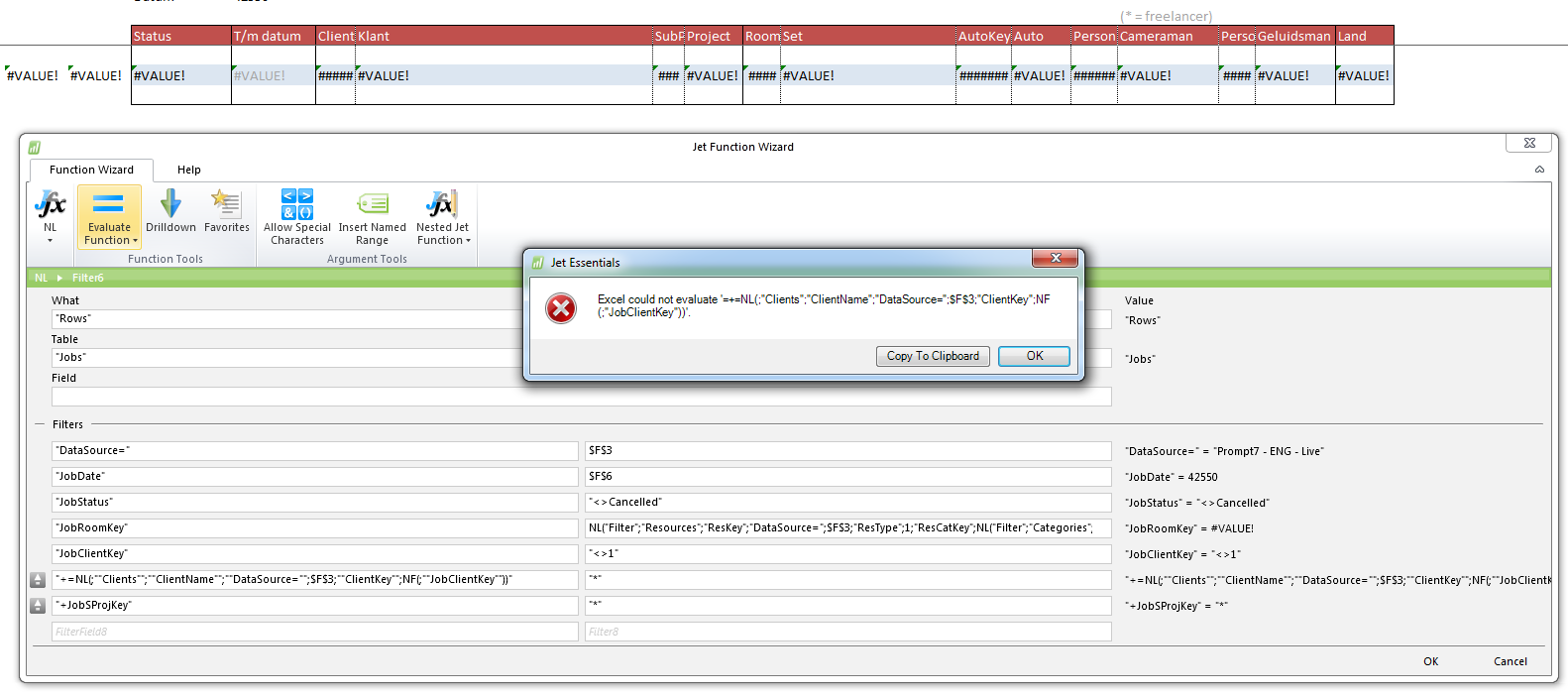
Unfortunately I get an error. Can someone help me with this?
Thanks in advance!
Best regards,
Gerard
Date
Votes
2 comments
-

Jet Reports Historic Posts Official comment The sorting technique you are employing is for use with Dynamics NAV databases.
For a SQL database, I would think that you would need to use the "SQL=" feature and define your query and sort (or "Order by"). -
Jet Reports Historic Posts Thanks for your reply and pointing me in the right direction. I didn't know that, sorry.
This is the formula I ended up with. Works great for me:=NL("Rows";"SQL=SELECT JobKey FROM Jobs, Clients, SubProjects WHERE JobStatus<>'Cancelled' and JobClientKey<>1 and JobDate between '"&$D$6&"' and '"&$D$6&"' and JobRoomKey in (SELECT ResKey FROM Resources WHERE ResType=1 and ResKey not in (1030,1031) and ResCatKey in (SELECT CatKey FROM Categories WHERE CatDescShort not like '%Uren%'))"&" and Clients.ClientKey=Jobs.JobClientKey and SubProjects.SProjKey=Jobs.JobSProjKey ORDER BY ClientName, SProjDesc,JobTimeStartBooked";"JobKey";"DataSource=";$F$3)
Regards,
Gerard
Please sign in to leave a comment.