Hello -
Try this:=NL("Rows";"Item";"No.";"-=NL(""Count"";""Sales Invoice Line"";;""Posting Date"";"""&$D3&""";""Type"";""Item"";""No."";NF(;""No.""))";"*")
Date
Votes
4 comments
-

Jet Reports Historic Posts Official comment Hello Zed -
Performing a "sort by count" is almost identical to the "sort by sum" discussed here –> http://community.jetreports.com/viewtopic.php?f=23&t=2109&p=13237
Your functions would look like this:
and result in this: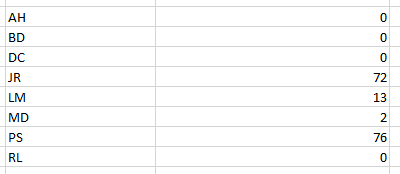
Here is how to embed your count and use it to sort the first NL function:=NL("Rows";"Salesperson/Purchaser";"Code";"-=NL(""Count"";""Sales Line"";;""Salesperson Code"";NF(;""Code"");""FA Posting Date"";"""&G$6&""")";"*")
resulting in: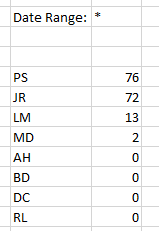
I hope that helps. -
Jet Reports Historic Posts Hi,
is it possible to sort primary key "Salesperson/Purchaser" person order by orders what they made?
My primary key is table of persons=NL("Rows";"Salesperson/Purchaser";"Code")
Number of orders=NL("Count";"sales line";;"Sales person code";$F9 (pointer to first NL function);"Date";G$6")
I dont know how use second NL function in first, because in second order i need code of person from first NL result:)
Regards, Zed. -
Jet Reports Historic Posts Amazing, thank you, you are jetreports god :)
-
Jet Reports Historic Posts Hi again…
With sales person works perfectly.
I need sort items by sales sum. And this dont works.
I want write all items from table Item, sum by balance from sales invoice lince. First NL function works good. Second Funciton works too, alone, but in one funciton not.
Is there error?nl("rows";"items";"No.";"-NL(""Count"";""sales invoice line"";;""posting date"";$D3;""type"";""Item"";""No."";NF(;""No."")";"*")
Please sign in to leave a comment.