Hi,
I need to create a report that shows all the contacts that are linked to the sell-to-Customer for the YTD Sales.
I have created the report for the YTD Sales for the Customer via the Customer Ledger Entry Table, but I am struggling with trying to show all the contacts for each customer that I am struggling with, so far it will only show me one contact per customer, but I require every contact, the only link is via the Contact Business Relation table but this only shows me the Contact Company as that is the contact No in this table.
I expect I am over complicating it, but any help appreciated, I usually only use Table builder which is probably where I am struggling with the linking
Thanks in advance
Date
Votes
5 comments
-

Jet Reports Historic Posts Official comment Please see attached where I have linked to contact to the customer
-
Jet Reports Historic Posts Here are a couple of basic methods (you'd have to flesh them out, of course)…
Using a "Grouping Report":
Using Table Builder: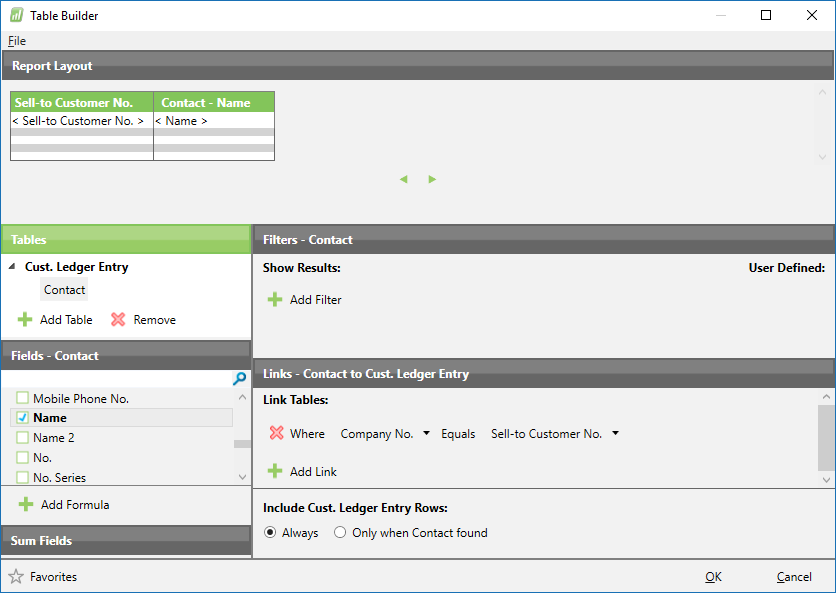
-
Jet Reports Historic Posts Hi HPDeskJet,
Thanks for your thoughts, however the Sell-to-customer no does not equal the company no of a contact as they are different tables, so the below will not work, I believe you need to add in the contact Business relationship table so the contact no in this table equals the company no in the contact table & the No equals the sell to customer no in the cust ledger table but this is where I start to struggle with the filtering to all contacts for a sell to customer no that has sales for ytd -
Jet Reports Historic Posts Thanks Johns051, I had got further on & was close, although the report was taking a long time to run, I will look over your version as it looks a little more efficient than mine, many thanks for looking & helping, I will post back my progress update
-
Jet Reports Historic Posts An update - using my version of the report took almost 7 minutes to run, using johns051 version it was down to 2 mins 50 seconds, so your report is more efficient. I had to add in some more columns & a date filter for ytd to make the reports like for like, but the difference was in the way you filtered on the contact business relationship table
=NL("First","Contact Business Relation","Contact No.","No.",G9,"Link to Table","Customer")
This was the only real difference between our reports as I had this on a new row.
Thanks for your suggestions
Please sign in to leave a comment.