Hello Ben -
The best place to ask Jet Express question is on the Jet Express Community Site (http://expresssupport.jetreports.com).
However, since we're here, let's discuss this question.
By default, Excel will always recalculate a workbook upon opening it. To override this, Jet Express for Excel includes the special keyword "+VALUES" for inclusion in cell A1.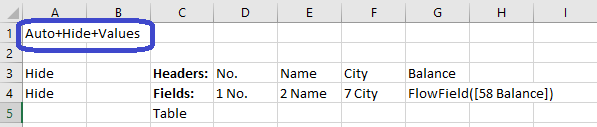
Ensure that cell A1 is set to Auto+Hide+Values and that you have saved the workbook in REPORT mode (versus DESIGN mode).
In this way, Excel will not call upon the Jet Excel add-in to recalculate the Jet functions when the workbook is opened.
Date
Votes
1 comment
-

Jet Reports Historic Posts Hi everybody,
I have a jetReport file and on some computer, when I open it, it automatically refresh. I have looked in the options but I'm not able to remove this function.
Does anybody have a tip for me? We are using JetExpress.
Thanks for your help
Ben
Please sign in to leave a comment.