Hi All,
I encounter a new error message on Jet Reports yesterday and i'm stil doubtfully.
An unexpected error has occurred:
Unable to get the Count property of the Pictures class
System.Runtime.InteropServices.COMException
at System.RuntimeType.ForwardCallToInvokeMember(String memberName, BindingFlags flags, Object target, Int32[] aWrapperTypes, MessageData& msgData)
at Microsoft.Office.Interop.Excel.Pictures.get_Count()
at Jet.Excel.JetWorksheet.i(String jetAddInPath)
at Jet.Excel.JetWorkbook.f(String jetAddinPath)
at Jet.JetDispatcher.i()
at Jet.JetDispatcher.e(Boolean saveUserData)
at Jet.JetDispatcher.at()
at Jet.JetDispatcher.b(Object[] A_0)
at Jet.JetDispatcher.Dispatch(Object[]& args)
i just remenber add a form in order to obtain a rectangle with rounded edges…
If someone can provide an answer, I will appreciate a lot
thank you
Date
Votes
2 comments
-

Jet Reports Historic Posts Official comment You'll want to check your Excel configuration and then try again.
Select File, Options, Advanced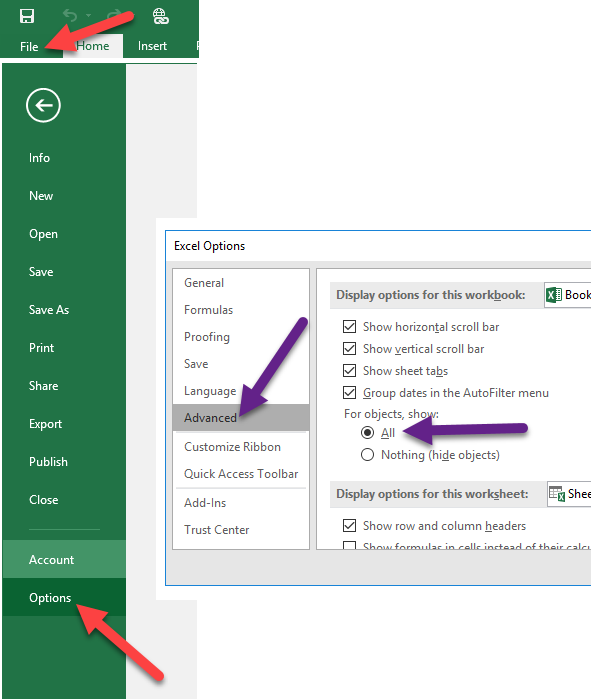
and then ensure that the setting For object, show: is configured for All -
Jet Reports Historic Posts Ho Thank You !!
Have a nice day
Please sign in to leave a comment.