Hi,
I wonder if someone maybe able to assist me with my question:
Is possible to create a filter from a formula using table builder?
I am creating a report via table builder which is looking for all purchase orders where the cost code in the dimension value table is set to blocked. I have created 2 formulas in separate columns, the first is: =NP("Formula","=IF([@[Purchase Header - No.]]="""",""Hide"",""Show"")") and the second is: =NP("Formula","=IF([@[Dimension Value - Blocked]]=True,""Show"",""Hide"")").
I would like to create 2 filters which picks up 'Hide' from formula 1 and 'Show' from formula 2.
I've attached a screen shot.
Hoping someone maybe able to advise if this is possible, I have a feeling I may have to create the report from scratch using the wizard……
Many thanks
Amy

Date
Votes
1 comment
-

Jet Reports Historic Posts Hello =
Conditional Hiding (as described in the online knowledgebase) does not apply to the NL("Table") function.
What it appears you want to do, however, is to filter based on your NAV advanced dimensions that impact the Purchase Header table.
In my demo database, there are a couple that do: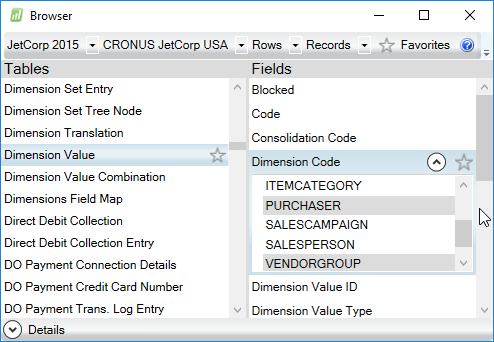
So, I used Table Builder to create a report showing some Purchase Header info - including those dimensions: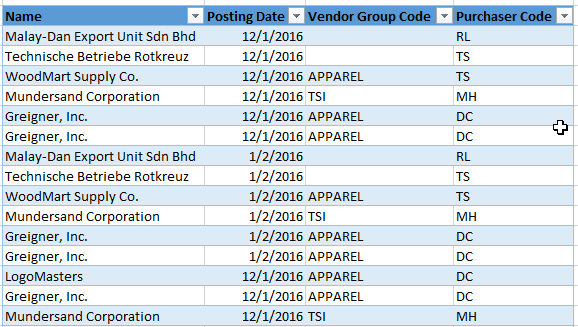
Let's assume that I only want to see records where my Vendor Group dimension is set to TSI.
I'd go to Table Builder, open the template that I saved, and add a filter: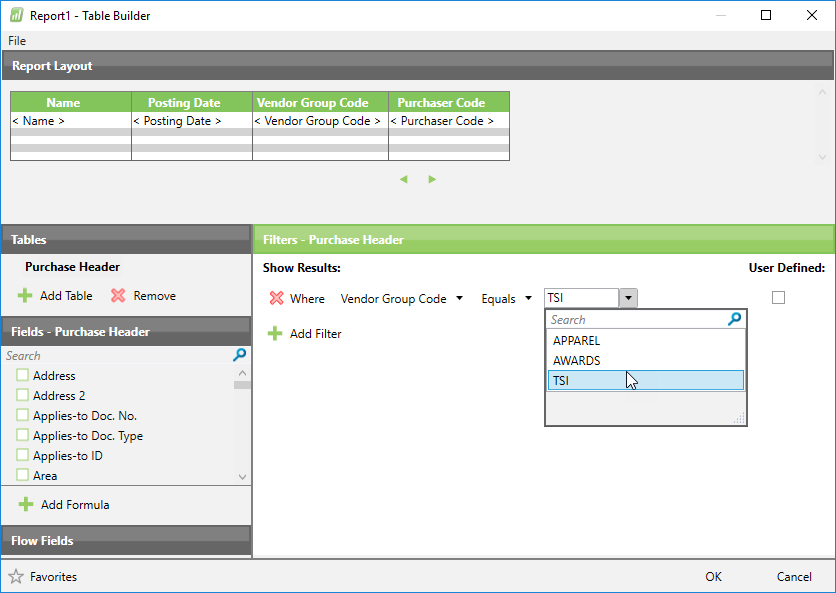
Now, when I run my report, I only see those records: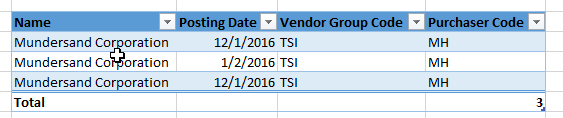
I hope that helps get you going.
Please sign in to leave a comment.