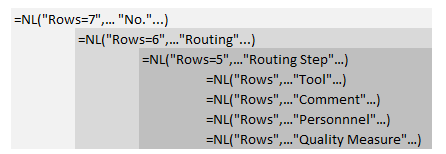
I have a report that is reading the Production Order table and then linking to the associated Prod. Order Routing Line table for the job steps. I have them setup as below and that part is working correctly.
Col C Col D Col E
=NL("rows=6","Production Order",,"Routing No.",$D$3,"No.",$D$6)
=NL("Rows","Prod. Order Routing Line",,"Prod. Order No.",H11)
Here is where I am having problems. In addition to the Routing Lines, each Routing Line can have one or more optional lines in any of 4 additional tables, Routing Tool, Routing Comment, Personnel or Quality Measure. I have them all set up in Col E as below. The data in any of the tables should be interleaved with the associated Job Step as below
Routing
Routing Step 10
Tool 1
Comment 1
Comment 2
Routing Step 20
Comment 1
Quality Measure 1
Quality Measure 2
Personnel 1
etc
Col C Col D Col E
=NL("Rows","Prod. Order Routing Tool",,"Prod. Order No.",H12,"Operation No.",G12)
=NL("Rows","Prod. Order Rtng Comment Line",,"Prod. Order No.",H13,"Operation No.",G13)
=NL("Rows","Prod. Order Rtng Qlty Meas.",,"Prod. Order No.",H14,"Operation No.",G14)
=NL("Rows","Prod. Order Routing Personnel",,"Prod. Order No.",H15,"Operation No.",G15)
What is happening currently is that everything is printing after the last Job Step. If there are no optional rows, 3 blank lines are printed. If there are optional rows, only the ones associated with the first Job Step are displayed.
How and where do I position the 3 optional tables so their data is interspersed with the associated Job step, and then only if they exist so there are no blank rows?
Below is a screenshot showing what the report should be returning. The left side shows what the report is returning and the right side shows what should be coming back. As you can see, all of the optional data for the first step appears at the end of the list as indicated by the red box. Optional data for other steps indicated by the blue box is not being returned at all.

Thanks in advance for any ideas and or suggestions