
Hi all,
https://www.jetreports.com/downloads2/
I'm relatively new to JetReports, so maybe my question is an easy one…
I would like to have a filter on the Value Entry table in NAV, but this filter should be based on the data presented.
From Value Entry I retreive at least the following columns:
- Entry No.
- Posting date
- Item Ledger Entry No.
- Document No.
- Qty Received/Not Invoiced.
My first filter is a normal one on Posting Date. That's easy.
My send filter should be a filter that presents only rows where the sum of Qty Received/Not Invoiced per Item Ledger Entry No is not equal to 0 (zero0
How do I set this filter? It's necessary to filter the data, since the table is huge (7+ years of data).
I'm looking forward to your ideas!
Thanks!
Date
Votes
2 comments
-

Harry Lewis Hello.
The fastest way to accomplish this would be to use the Jet Excel add-in's Conditional Hide feature to simply hide those rows where the sum is equal to zero.
The technique to truly filter out zero-sums is related to the Sort by Sum technique detailed in the online knowledgebase.
To illustrate, I created this simple report based on the Cust. Ledger Entry table:

When I run the report, several customers have zero sums for that time period:
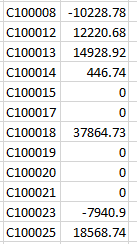
Using the technique described in that KB article, I modified my NL(Rows) function - incorporating the NL(Sum) as a filter:
=NL("Rows","Cust. Ledger Entry","Customer No.","=NL(""Sum"",""Cust. Ledger Entry"",""Amount"",""Customer No."",NF(,""Customer No.""),""Posting Date"","""&$C$3&""")",">0")
Now when I run the report, all zero-balance customers are filtered out:
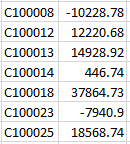
Yes, because you must sum up the values for each record returned, this will take longer to run.
I hope that helps.
-

Malcolm Johnson Hi
I would be inclined to filter the item list with a filter on the Options tab like this: =NL("Filter","Item Ledger Entry","Item No.","Entry Type","Purchase","Completely Invoiced","No")
If you then list your items based on this filter you will get a list of only those purchased items that are not completely invoiced. in addition if you have a large amount of data, by pre-filtering the item list the report run faster
Hope this helps
M
Please sign in to leave a comment.