=NL("Rows","GL20000") only gives me the key fields
"DataSource","Company","GL20000","DEX_ROW_ID","4319917"
How do I use a * on the fields to get it to list all the fields inside the row?
=NL("Rows","GL20000",{"*"}) is not working
=NL("Rows","GL20000") only gives me the key fields
"DataSource","Company","GL20000","DEX_ROW_ID","4319917"
How do I use a * on the fields to get it to list all the fields inside the row?
=NL("Rows","GL20000",{"*"}) is not working

Hi Garfield -
Once you have the function:
=NL("Rows","GL20000")
you can use the NF() function to show any field you want.
e.g.,
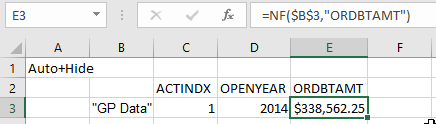

Hi Harry
The issue is want to be able to see the all the fields without invoking the NF function.
=NL("Rows","GL20000") gives me

I want to achieve this with just =NL("Rows","GL20000","*")
The combination of "*" , "{*}" , "{"*"} is not working.

I can point it to a blank cell if it is in table mode
The other option would be to use the NL(Table) function.
=NL("Table","GL20000")
I have to generate the table and extract out the field names, which is not really efficient.
BTW, blanks is totally not working for filters if pointing empty ranges.
Hello Garfield -
The NL(Table) function can be used to retrieve an entire table of data (as in the previous example) or to retrieve only specified fields:
=NL("Table","GL20000",{"ACTINDX","Correcting_JE_Year","Adjustment_Transaction","CRDTAMNT","DOCDATE","ORGNTSRC"})
You are correct, empty filters are not allowed, let's assume this example:
=NL("Table","GL20000",,"ACTINDX",C5)
If cell C5 is blank, this function will result in a #VALUE! error
We can compensate for that through the use of a slight modification:
=NL("Table","GL20000",,"ACTINDX","@@"&C5)