I am trying to build a report (NL (Rows)) for G/L Accounts which have a balance of <>0 at a past date. Currently in our Nav the Balance or Balance at Date regardless of what date you set the filter it will bring today's balance on the account, so can't use this. Was wandering if there is a way I can link a GL Function into this NL one. Have tried a couple of ways but none seem to work for me. Hope someone has figured this out.
Date
Votes
2 comments
-

Harry Lewis Hello Gaspar -
Assuming that you are using Dynamics NAV, here is an example.
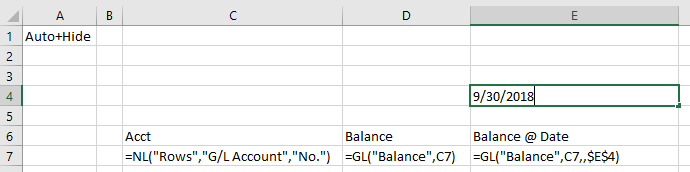
I built a rudimentary GL balance report showing current balance and balance as of a specified date:
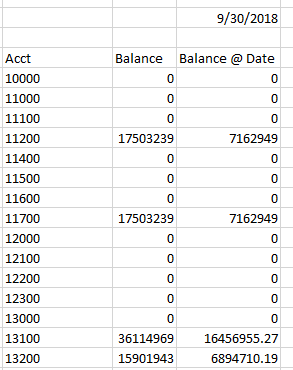
When I run it, it looks like this:
If I want to remove those accounts where the as-of balance is zero, I can filter my NL function by using a modified version of my GL function as a filter:
=NL("Rows","G/L Account","No.","=GL(""Balance"",NF(,""No.""),,$E$4)","<>0")This technique is very similar to that used in the Sort-by-Sum.
Now, when I run my report...
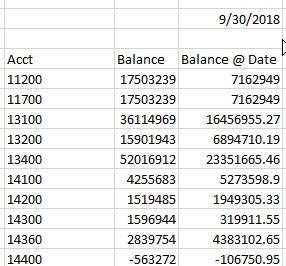
I see only those accounts with a non-zero balance.
-

Gasper Jubani Thank you for taking your time and the solution Harry, it worked perfectly.
Please sign in to leave a comment.