I am having difficulty getting Dynamics NAV FlowFields to filter properly. I am trying to filter the Item table by
location. No matter what I try, I get the unfiltered values.
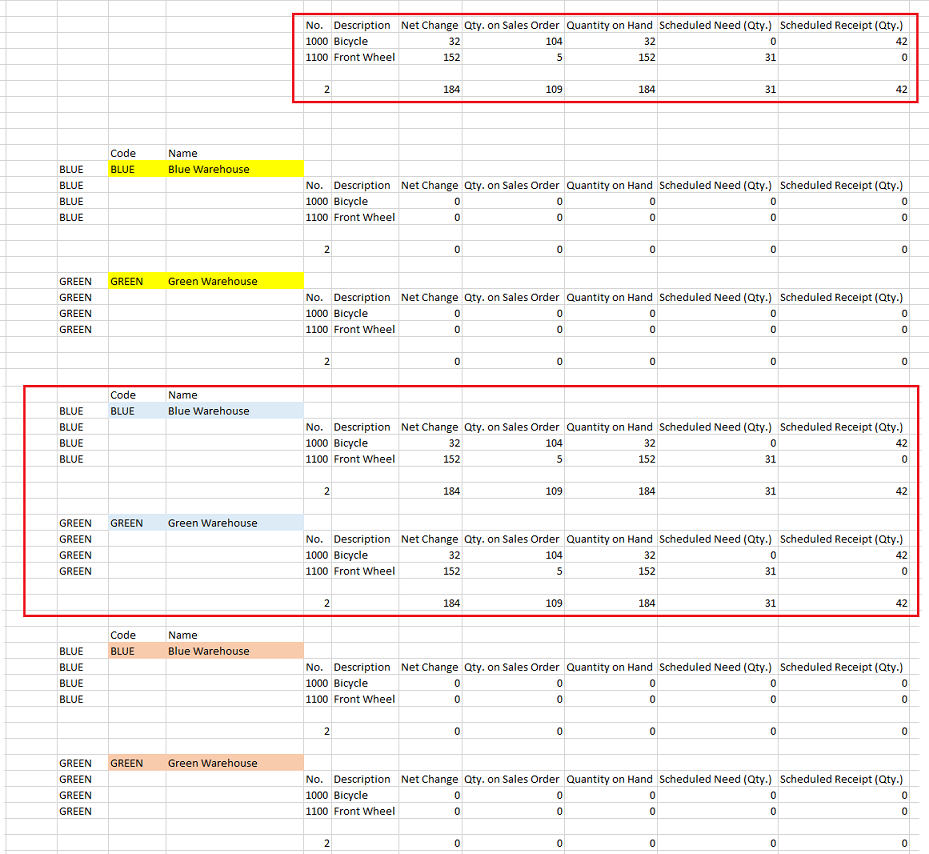
Here are the combinations I have tried running in the CRONUS database. I am running only for Items 1000 and 1100.
If I try to filter the NF, it always returns zero. If I try to filter the secondary NL, it always returns everything.
1. Everything with no filters except as noted
=NL("rows","Item",,"No.","1000|1100")
2. Running against the Location table, no filter on the secondary NL, filtering in the NF fields
=NL("Rows=6","Location",,"+Name","*")
=NL("rows","Item",,"No.","1000|1100")
=NF($G14,"Net Change","Location Filter",$E14)
3. Running against the Location table, filtering on the secondary NL, no filter in the NF fields
=NL("Rows=6","Location",,"+Name","*")
=NL("rows","Item",,"Location Filter",$E22,"No.","1000|1100")
=NF($G22,"Net Change")
4. Running against the Location table, filtering on the secondary NL, filterinf in the NF fields
=NL("Rows=6","Location",,"+Name","*")
=NL("rows","Item",,"Location Filter",$E31,"No.","1000|1100")
=NF($G31,"Net Change","Location Filter",$E31)
Here is a screen shot showing what I am getting when I run the above. Thanks for any ideas and/or suggestions.