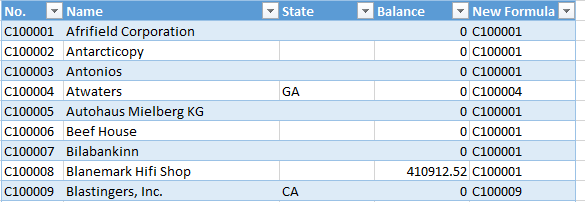
Looking for some assistance using the NP function with an IFERROR function, please bare with me as I try to explain the issue I am getting.
Information:
- NL Function is being used to generate a Table
- One of the columns in this table uses an NP function to run an additional NL function
- The NL function in the NP function runs perfectly fine but it does reference a NULL values on different rows resulting in a #VALUE! error in that particular row.
The null value is to be expected as this table does contain fields which are null/empty, if the field it references does contain a value it works perfectly.
How can I use Excel's IFERROR function to replace the #VALUE! with an empty value.
If would expect it to be like =NP("Formula","=IFERROR(=NL("......")," ")) but that didn't work for me. Any help would be greatly appreciated.