
I am using multiple NL functions to create rows (not on the same row) and I having issues with it not resetting correctly when I go back into design mode after running the report to test it. It does not shrink back down. What could cause this?
Date
Votes
2 comments
-

Harry Lewis Hello Christopher -
If I understand correctly, when you return to Design mode, you see something similar to this:
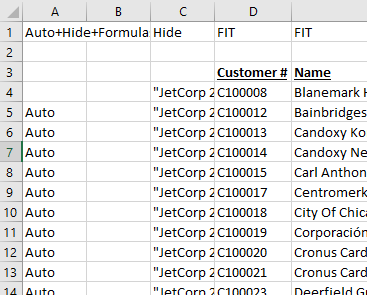
where the NL(Rows) functions do not revert back and there are still Jet keywords in column A.
When a Jet report is run, a backup copy of the design of your report is saved so that it can be restored to return the report to Design mode (and the backup is then removed). While unusual, if some issue interferes with the creation or restoration of that backup copy, it can result in what you describe.
By far, the easiest method to correct this is to re-create your functions in a new workbook.
If that is not an option, the alternative would be to check if one or more incorrect backups are someone being kept. While this process is not difficult (it simply involves working in the Visual Basic for Applications properties Window), it can lead to additional challenges is not performed correctly. I would recommend submitting a support request, so that a Jet Support Technician can do it for you.
-

Matthew Wilson From Support:
Thanks for your quick reply. I started over in another worksheet and I think it had something to do with my NL functions being in Column A. Thank You for your quick response!
Sincerely,
Christopher SmithData Support Specialist
Please sign in to leave a comment.