How would I use the > sign in an NL function?
=NL("Sum","Job Ledger Entry","Total Price ($)","Entry Type","Usage","Job No.",I12,"Posting Date",">"&K12)
I get an Invalid Filter ">" error message.
How would I use the > sign in an NL function?
=NL("Sum","Job Ledger Entry","Total Price ($)","Entry Type","Usage","Job No.",I12,"Posting Date",">"&K12)
I get an Invalid Filter ">" error message.

I need to return the sum of Total Price for all lines that have an entry type of usage after the sales invoice has been posted.

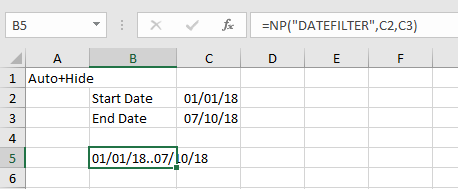
Cara - I believe the only way to deal with dates is using the DATEFILTER command.
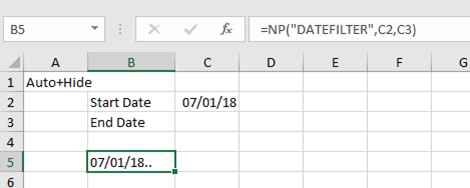
NOTE: I have included the DateFilter formula in the formula bar for both screenshots
Normally, it would look like this:
But, I think this will get you what you are looking for:
This doesn't work because I need the date in the filter to actually be greater than the date shown in the referenced cell, not between or from a certain date.
the second filter I am showing is the equivalent of "equal to or greater than" - that's how DATEFILTER works if you don't have a date in the end period.
It can also work in the reverse if you don't have a date included in the start period.
My database is Navision - in case that makes any difference
Thanks, I can not seem to get this to produce the results I want.
example scenario:
I would like to have a report of all the "Sale" job ledger entries that are posted AFTER the last "Usage" entry type for each Job.
=NL("Sum","Job Ledger Entry","Total Price ($)","Entry Type","Usage","Job No.",I12,"Posting Date",">"&K12)
The DATEFILTER takes into account the date I have in K12 and returns anything greater than or equal to, I need just greater than. Is there a way I can add 1 day to the date in K12 and then use the above NL function?
you should be able to add that into the formula
=NP("DATEFILTER",K12+1,"*")