I have an excel file with 2 tabs that both have jet reports in them. When I click on REFRESH, it only refreshes the info on the first tab. In order for me to also refresh the info on the second tab, I have to go on design mode and type the filter in, then run the refresh. Is there a way to fix this?
What's weird is that when i copy the design info on the second tab and paste it on a separate excel file with nothing else in it, it refreshes without issues.
Date
Votes
3 comments
-

Harry Lewis Hello Lyn -
I'm not exactly sure what you mean by "I have to go on design mode and type the filter in".
If that means that there is a cell on that worksheet that contains data used in the Jet functions on that worksheet, you'll want to be sure that that cell is configured as a Report Option (otherwise, changes made to a sheet - while it is in Report mode - get over written when such a report is re-run).
If you do not feel that what I've mentioned here is the issue, I would encourage you to submit a request to the Jet Tech Support team - they can delve much deeper than can be done here in the discussion forums.
If you are able to resolve the issue, coming back and updating this thread would be great for us to have an understanding of the true nature of the issue and its resolution.
-

Lyn Teodoro Not really sure how to explain this properly but say I needed to change the Lot No. for the reports on both tabs...so I click on REFRESH and change the Lot No. filter from ABC1 to ABC2 and click on Run. This refreshes the data on the first tab, but not on the second tab. For the second tab to refresh with the data for ABC2, I have to go on design mode and type in ABC2 there first (see photo), then click on Refresh again. If i don't do that, the second tab does not refresh the data for the second tab.
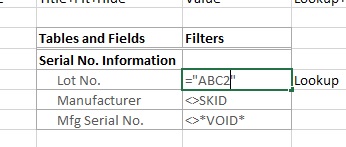
-
Harry Lewis Hi Lyn -
On the second sheet, does your filter reference back to the first sheet like this?
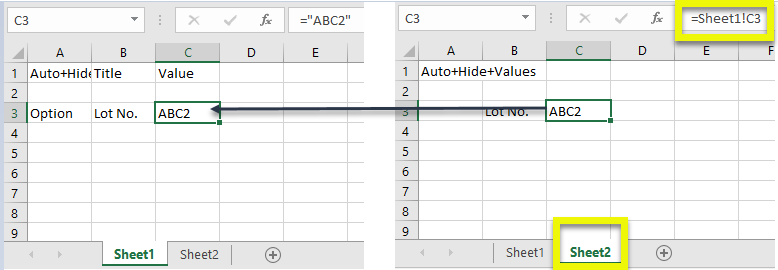
so that it gets updated when you fill in the Report Options:
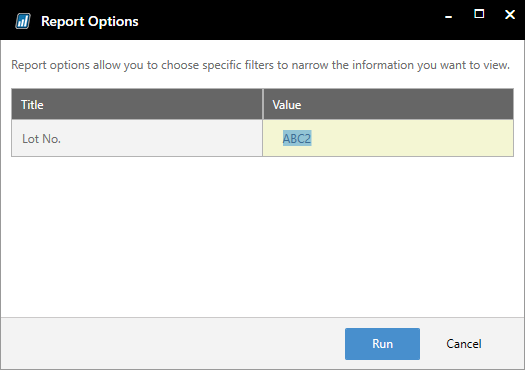
Please sign in to leave a comment.