We use GP, how can I use Date Comparison in Jet Dashboard?
I saw this link, but how can I achieve it in Jet Dashboard?
Thanks.
We use GP, how can I use Date Comparison in Jet Dashboard?
I saw this link, but how can I achieve it in Jet Dashboard?
Thanks.

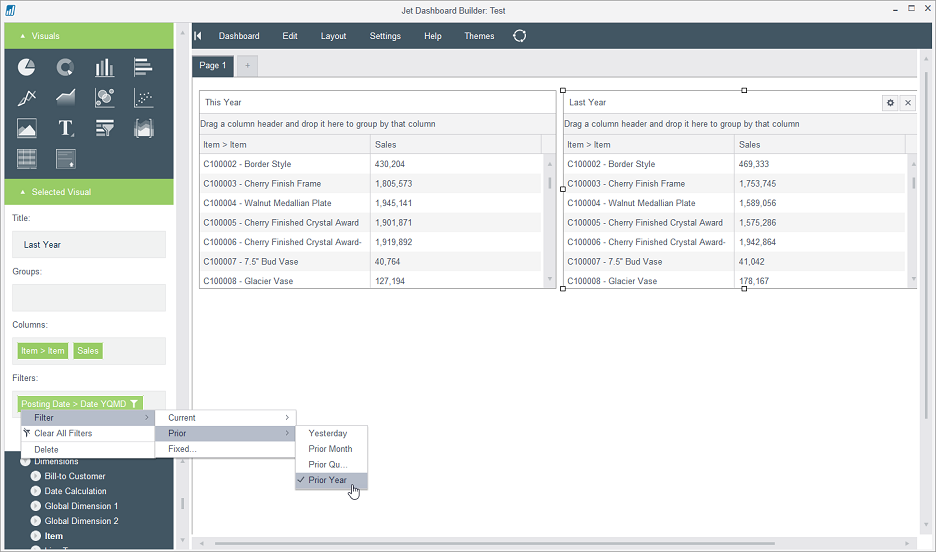
It looks like this in Dashboard when I add Date Comparison in Jet Dashboard


Hello Newman.
What are you trying to accomplish?
Are you wanting to use date comparisons in a slicer (so that you can control what data is displayed in other visuals)?
This is what I achieved in Excel, but how can I make it happen in Jet Dashboard?

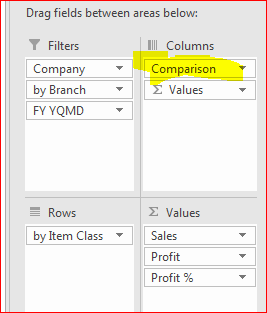
But when I add "Date Comparison" into Dashboard, it looks like this. It doesn't give me what I have done in the Excel.

Thank you, Newman.
The Date Comparison is design for use in the Columns area of a pivot table and is computed "on the fly" within the pivot.
Since the data does not exist within the Cube itself, there is no way to include it in a Dashboard.
You could create visuals (multiple data grids, for example) and then filter visual by a separate data period to show data for only that date period.
e.g,.