Hello all,
I am trying to hide values that = 0. It works when not grouping, but I cannot get it to work inside of grouping. Anyone know why? thanks!
Hello all,
I am trying to hide values that = 0. It works when not grouping, but I cannot get it to work inside of grouping. Anyone know why? thanks!

Hello Vivian -
Excel's grouping feature shows and hides rows based upon the grouping. It overrides any other row hiding.

Hi Harry! Thanks for the reply. The problem is that I want to hide/show based on a calculated field. If the calculation equals zero, I want to Hide the row. Do you know if there is any work around for this?
Hi Vivian -
The only method would be to include the calculated field as a filter in the original NL(Rows) function, so that you filter out those records you do not want to see.
As a simple example, consider this report where I am listed customers and a calculated value:

I would like to adjust my results...
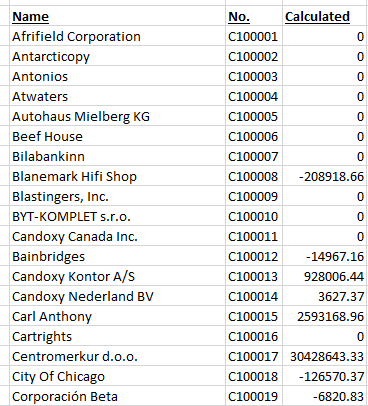
so that zero values are not shown.
I would have to include my calculated field as a filter in my NL(Rows) function:
=NL("Rows","Customer",,"=NF(,""Balance"")-NF(,""Profit ($)"")",">0")

results:
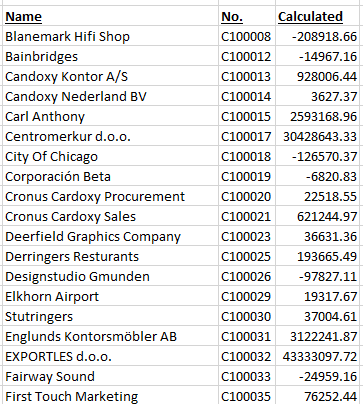
If you were to employ that method, there would be no "hidden" rows for Excel's grouping feature to reveal.